
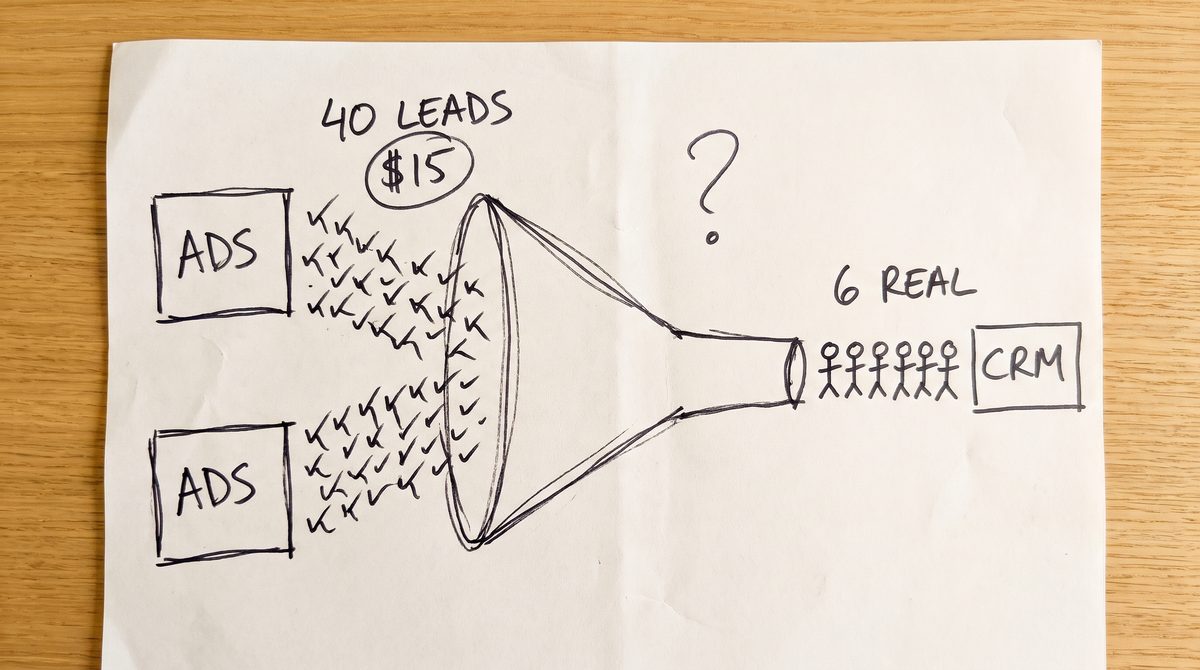
Say a cleaning company spends $600 on Google Ads in a month. The account reports 40 leads at $15 each, and Meta claims another 25. The owner opens the booking list and finds six paying customers. The ad accounts are counting things that are not sales, and the bidding learns from them.
Here is how to find what is being counted, which settings to change, and how to teach Google Ads and Meta to look for real buyers.
Key takeaways
- A fake conversion is anything the ad platform counts that never became a paying customer or a real enquiry.
- Only Primary conversion actions feed Google Ads bidding. Keep paid orders or real leads Primary and move the rest to Secondary.
- Count leads as One per click, purchases as Every, and send a unique transaction ID with each order.
- If fewer than 30% of reported conversions match real orders or CRM leads, fix tracking before adding budget.
- Google accepts offline sales up to 90 days after the click, so upload closed sales well inside that window.
What are fake conversions in Google Ads?
Fake conversions are actions Google Ads or Meta report as conversions that never became a paying customer. The usual causes are spam form fills, purchase tags that fire twice, wrong order values, view through credit and short or junk calls. Most can be fixed in the account settings.
| Cause | What it looks like | Fix |
|---|---|---|
| Spam form fills | Made up names, sales pitches, the same email twice | Count leads One per click, add a qualifying field |
| Duplicate purchases | More purchases in the ad account than orders in the shop | Unique transaction ID, matching event_id on Meta |
| Wrong values | Every order shows the same or a test value | Pass the real order total, restate past ones |
| View through credit | Sales claimed by ads nobody clicked | Judge clicks and views separately |
| Junk calls | Wrong numbers and very short hang ups | Raise the minimum call length |
Which settings stop most fake conversions?
This matters because the count is also the lesson. Google’s Ads Help explains that Primary conversion actions are used for bidding, while Secondary actions are for observation only, unless they sit inside a custom goal. If a spam form counts as a lead, the bidding learns to find more spam. In Google Ads, open Goals, then Conversions, then Summary, and work through these.
- Primary vs Secondary. Keep only paid orders, booked jobs or qualified leads as Primary. Page views and button clicks become Secondary.
- Count setting. Set lead actions to One and purchases to Every, the split Google itself suggests.
- Transaction ID. Google’s Ads Help says a customer who reloads or revisits the confirmation page can fire the tag again, and a unique transaction ID lets Google drop the repeat. If the Meta pixel and the Conversions API both send a purchase, Meta’s developer docs say both need the same event_id and event_name.
- Call length. Google counts a call only when it lasts longer than the minimum you set. If a real booking call takes at least a minute, start at 60 seconds.
- Values. Compare five recent orders with what the platform recorded. Fix any gap in the tag, then use conversion adjustments to retract or restate past conversions.
- View through. Google reports view through conversions on their own, outside the main Conversions column for most campaign types. In Meta Ads Manager, check whether the attribution setting includes one day view before you judge an ad.
If you run Google and Meta together, both may claim the same customer, so the totals add up to more than you sold. The fix is to split the credit so each sale counts once, with conversion tracking that starts from real orders and bookings rather than from each platform’s claims.
These settings clean the count. They do not tell the platforms which leads became customers, so a spam lead with a real looking email still counts.
How do you stop the algorithm buying fake conversions?
The lasting fix is to tell Google Ads and Meta which leads paid. Save the click ID (GCLID) or the email with each lead, for example in a hidden form field. When the lead pays, upload the sale against it. The bidding then learns from money, not from a submit button.
Google’s Ads Help describes enhanced conversions for leads as an upgraded version of offline conversion import that matches details such as email addresses. Google accepts offline sales up to 90 days after the click. Meta’s developer docs recommend sending offline events in real time or at least daily.
A weekly file upload is fine for a few sales a month. With more volume, connect the CRM so it runs on its own. ObserviX is one example of a marketing attribution platform that links ad clicks, site visits and CRM records, then sends only verified sales back to Google Ads and Meta.
Start with paid order or booked job as Secondary, and make it Primary once sales flow in steadily. If you close only a handful of sales a month, keep the qualified lead as the goal. There is too little data for bidding to learn from sales alone.
How do you check ad conversions against real sales?
Set aside 15 minutes with last month’s ad reports and your real orders or enquiries.
1. Pick one campaign and one month
Use the Conversions column in Google Ads, not All conversions, and the Results column in Meta Ads Manager.
2. Count the real ones
A real enquiry is a real person with a real need, booked or not. For a shop, count paid orders that were not refunded.
3. Work out the match rate
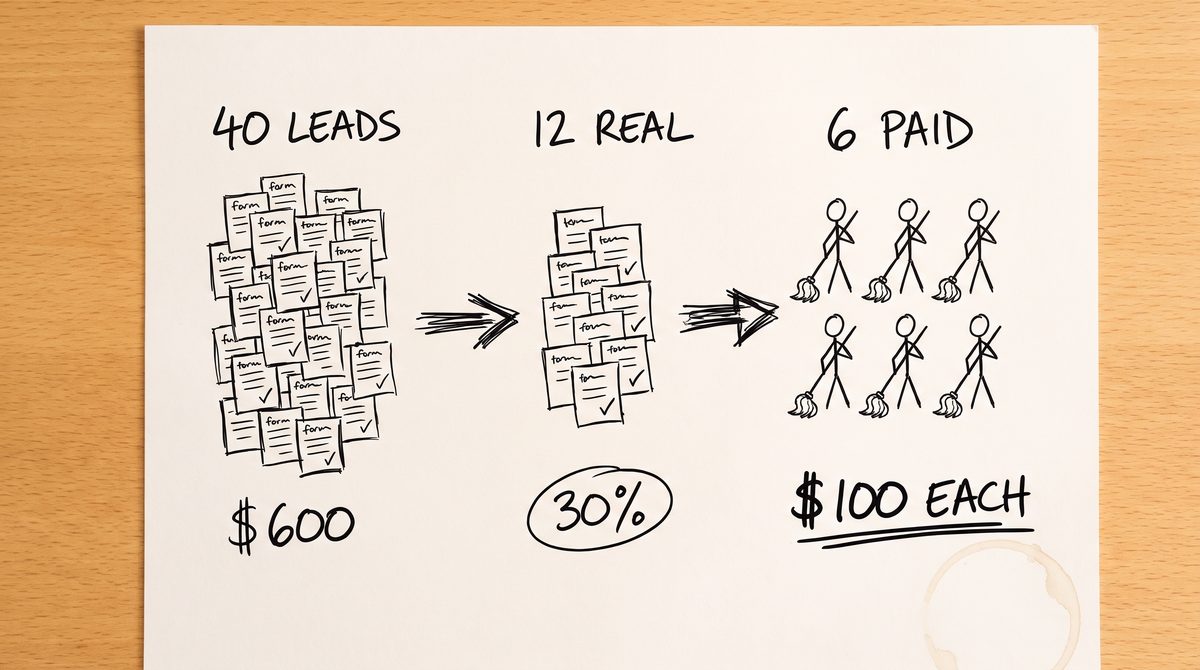
Divide real by reported. Say the cleaning company had 40 reported leads from $600 and found 12 real enquiries and 6 bookings. The match rate is 30%, and each customer cost $100, not $15.
4. Decide what to do
Above 70% is mostly healthy. Between 30% and 70% points to junk or duplicates, so work through the settings above. Below 30%, fix tracking before adding budget. These bands are our rule of thumb, not an official benchmark.
Common questions
Why does Google Ads show conversions but no sales?
The action counted is usually a form fill or call, not a sale. Check which actions are Primary and whether any fire twice.
Why are my Meta ads getting fake leads?
Short forms with no qualifying question attract junk. Add one question a real customer can answer, such as postcode or type of job, and send paid sales back.
Do duplicate conversions change what I pay?
Not per click. They make bidding think conversions are cheaper than they are, so it keeps buying the same traffic.
This month, run the 15 minute check on your biggest campaign. If fewer than a third of reported conversions are real, change the Primary actions first, then start sending paid sales back.